TI-Nspire: Composition of Functions


Working with composition of functions on the calculator, is basically a numerical nesting of the defined functions (placing one inside the other).
f (g(x))

On the non- CAS calculator, we will be evaluating expressions for specific numerical inputs
(and not generating algebraic formulas).

First, let's look at obtaining a numerical value for a composition.

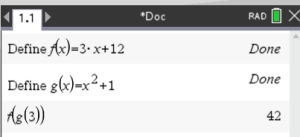
1. Find f (g(3)) for f (x) = 3x + 12 and g(x) = x2 + 1.
 

Open a new Calculator page.
1. Define the two functions:
, Actions, Define
Enter function f (x): Define f (x) = 3x + 12

2. Repeat the process for function g (x).
Enter function g(x): Define g(x) = x2 + 1


3.  Type f (g(3)) to evaluate the composition at x = 3.

The defined functions can be "called up" by pressing the key.


Checking an "algebraic" composition solution on the calculator.

We will find the algebraic composition of f (x) and g(x) by hand,
and then use the graphing capabilities of the calculator to check our answer.

2. Find f (g(x) "algebraically" when f (x) = 3x+12 and g(x) = x2 + 1.
 

Algebraic work by hand:
f (g(x)) = f (x2 + 1) = 3(x2 + 1) + 12

= 3x2 + 3 + 12 = 3x2 + 15

Is this correct?

Use calculator Graph page to check this result.

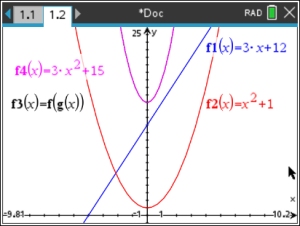
Graph f (x) (blue)

Graph g(x) (red)

Graph f (g(x)) (black)

Graph f(x) = 3x2 + 15 (our answer) (pink)

If our algebraic answer is correct, its graph will overlap the graph of f (g(x)).

Note: If you are still working in the same document where you "defined" functions f and g, you can go directly to f (g(x)) by calling up these functions by their names under the key.


You can click back and forth between the statements for f 3 and f 4 to see that they are the same graph.

This algebraic answer is correct.


divider
Table of Contents | MathBits.com | Terms of Use

Table of Contents MathBits.com Terms of Use TI-84+ Web Site